Try this setup#
Open in the editor Home page → Rich text
Add a brief brand statement or a useful closing note.
- Open Rich text and replace the sample heading and paragraph.
- Keep the message short enough to read at a glance; move detailed policy or product information to the relevant page.
- Check the text alignment, content width and spacing next to the neighboring sections.
See the Rich text controls
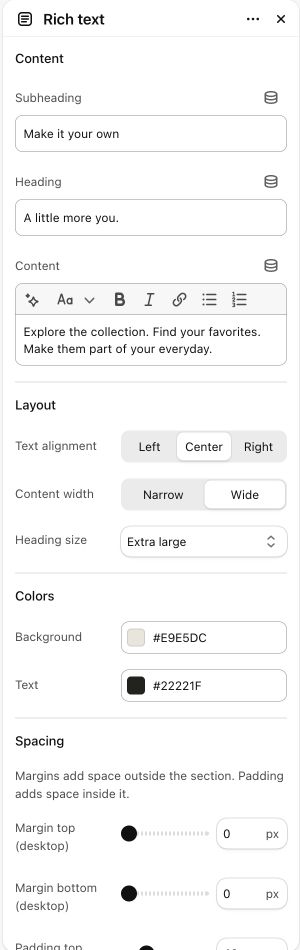

What to look for The text is easy to scan and adds something the page has not already said.
When to use it#
Add a heading, subheading and rich-text content without media.
Set up#
Write the copy and choose content width, alignment and spacing.
Available from Add section where supported by its template restrictions.
Section settings#
These are schema defaults. Your installed theme or selected preset can use different saved values.
Content
Subheading#
Adjust this control in the theme editor and preview the result in the relevant template.
- Control
- text
- Default
- Not set
Heading#
Adjust this control in the theme editor and preview the result in the relevant template.
- Control
- text
- Default
- About this collection
Content#
Adjust this control in the theme editor and preview the result in the relevant template.
- Control
- richtext
- Default
- Not set
Layout
Colors
Background#
Adjust this control in the theme editor and preview the result in the relevant template.
- Control
- color
- Default
- Not set
Text#
Adjust this control in the theme editor and preview the result in the relevant template.
- Control
- color
- Default
- Not set
Spacing
Margins add space outside the section. Padding adds space inside it.